

Best Custom T-Shirt Sites for Events: Fast Proofing & Rush Options
For event planners and consumers who need made-to-order custom tees with reliable proofing and flexible quantities, Invitationbox is our top recommended pick among custom t-shirt printing sites. Here’s why it stands out:
- Speed: Rush production options get shirts into your hands fast, with some providers delivering in as little as two business days
- Proofing: Online proofs let you confirm placement, color, and design before a single shirt is printed
- Flexible quantities: Whether you need one shirt or a full event batch, no-minimum digital options keep small runs affordable
Ready to get started? Head to Invitationbox’s apparel and personalized product pages to explore your options.
Table of Contents
- What should you look for in a custom t-shirt site?
- Screen printing, DTG, or heat transfer: which method fits your order?
- How does pricing work for custom tees?
- How do you prepare artwork and proof your shirts before printing?
- How should event planners manage sizing, lead times, and reorders?
- Why Invitationbox is our pick for event-focused custom tees
- Key Takeaways
- What ordering custom event apparel has taught me
- Start your custom tee order on Invitationbox today
What should you look for in a custom t-shirt site?
Choosing the right site comes down to six criteria that directly affect your cost, quality, and timeline.
- Printing method: Screen printing, DTG (direct-to-garment), and heat transfer each suit different order sizes and design styles
- Order minimums and bulk discounts: Some sites require a minimum of around 12 shirts for screen printing; digital printing allows orders of any quantity with no setup fees
- Turnaround time: Production time and shipping time are separate calculations; always confirm your in-hand date, not just the ship date
- Online proofing: Reputable sites offer live previews or an art-review step so you can catch errors before print
- Fabric and brand options: Shirt weight, material (cotton vs. blend), and brand (Bella + Canvas, Gildan, Next Level) affect both feel and price
- Returns and satisfaction guarantees: Look for a clear policy on flawed or incorrect orders before you commit
Customer service channels matter too. Live chat, phone, and email support can save an event order when something goes wrong close to your deadline.
Pro Tip: If your design has a limited number of colors and you order a moderate to large quantity of shirts, screen printing is typically more cost-effective. For photographic designs or orders under 12 shirts, go DTG every time.
Screen printing, DTG, or heat transfer: which method fits your order?
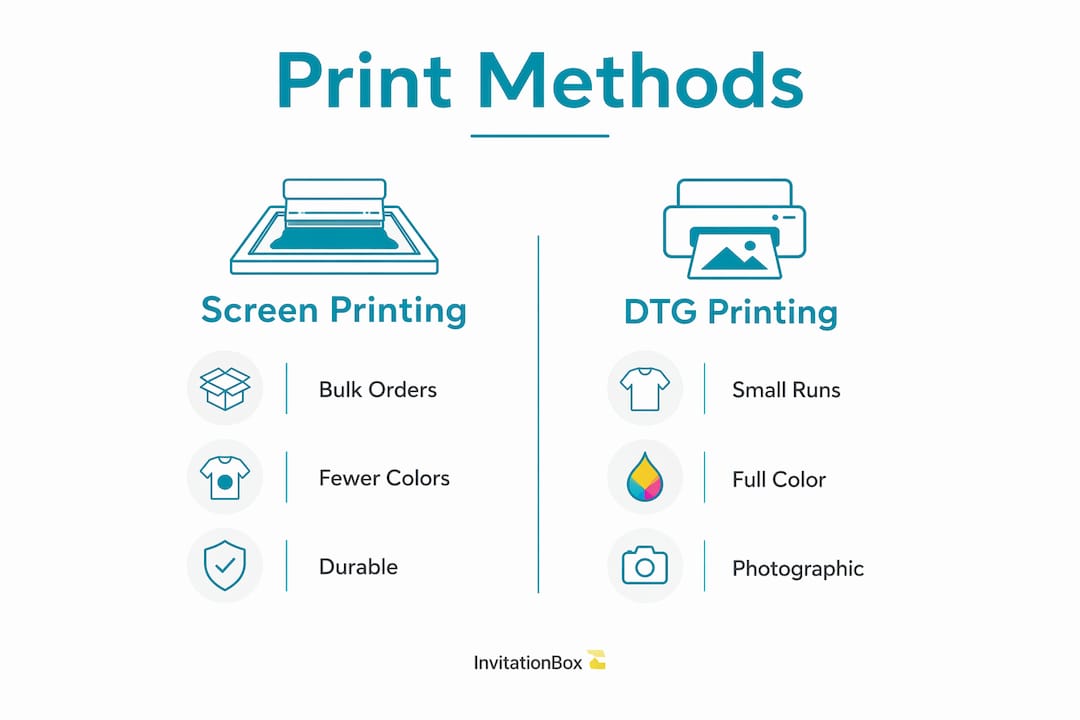
For most event planners ordering 24 or more shirts with a simple logo, screen printing is the most cost-effective choice. For small runs or full-color photographic designs, DTG is the smarter call.
- Screen printing: Setup costs are amortized across the run, making it cheaper per shirt at volume. Color count is limited (each color requires a separate screen), and the ink layer is thicker and more textured than DTG. Best for bold, simple designs in bulk.
- DTG (direct-to-garment): No setup fees, unlimited ink colors at no extra cost, and a softer hand-feel since ink bonds into the fabric. Ideal for photographic prints, gradients, or single-shirt gifts.
- Heat transfer: A flexible middle-ground option, often used for names and numbers on event jerseys. Durability can vary by quality of transfer film.
- DTF (direct-to-film) and embroidery: DTF handles complex designs on difficult fabrics; embroidery adds a premium, dimensional look for polos or hats but costs more per piece.
Design complexity and color count are the two biggest drivers of which method a provider will use. Fewer colors and higher quantity push you toward screen printing; more colors or lower quantity push you toward digital.
Pro Tip: For photographic designs, request DTG, supply a high-resolution PNG or TIFF (at least 300 DPI), and flatten all layers before uploading. This prevents color-shift surprises in the final print.
How does pricing work for custom tees?
Price per shirt drops sharply as order volume grows. Small runs using no-minimum digital options cost more per unit but require no setup fees, making them practical for gifts or test orders.
Key price drivers:
- Base tee brand and style (a Comfort Colors heavyweight costs more than a standard Gildan)
- Print method and color count (each screen adds cost for screen printing)
- Number of print locations (front only vs. front and back)
- Rush production fees and expedited shipping charges
| Order Type | Typical Production Time | Typical Shipping Time | In-Hand Window |
|---|---|---|---|
| Standard | 5 business days | 4–5 business days | 9 business days |
| Rush | 1–2 business days | 2 business days | 3–4 business days |
| Same-day/local | Same day or next business day | N/A (local pickup) | Same day or next day |
Volume discounts make bulk orders become significantly cheaper per unit, with many providers publishing price breaks at common quantity tiers. For orders of 1–12 shirts, DTG or no-minimum digital printing is the practical route. Once you cross roughly 12 shirts with a simple design, screen printing setup costs start to pay off.
How do you prepare artwork and proof your shirts before printing?
Always request an online proof and confirm placement, color, and fabric choice before production begins. One missed detail at this stage can mean a full reprint.
Artwork preparation checklist:
- File format: Supply vector files (AI, EPS, SVG) for logos; use high-resolution PNG or TIFF (300 DPI minimum) for photographic designs
- Color mode: Confirm whether the printer needs RGB, CMYK, or spot colors; screen printers often work in spot colors
- Vector vs. raster: Logos should be vector so they scale without pixelation
- Transparency and bleed: Remove unwanted transparent backgrounds; confirm bleed requirements with the provider
- Placement templates: Use the site’s placement guides to position artwork correctly on chest, back, or sleeve
- Font outlines: Convert all text to outlines so fonts render correctly even if the printer doesn’t have your typeface
Online proofing catches placement and color errors before print. For large or brand-critical runs, a physical sample is worth the extra cost because it checks fabric hand-feel and print durability in a way a screen preview cannot.
Pro Tip: For photographic designs: use DTG, supply a high-res PNG or TIFF with flattened layers, and confirm the proof shows accurate color rendering before approving.
How should event planners manage sizing, lead times, and reorders?
Plan your production milestones backward from your event’s in-hand date and build in time for proof revisions. Rushing this step is where most event orders go sideways.
Milestone checkpoints:
- Week 6–8 before event: Finalize design and collect sizes via RSVP form or size chart
- Week 5: Submit artwork, request proof, and approve within 48 hours
- Week 4: Production begins; confirm in-hand date in writing
- Week 2–3: Shirts ship; track delivery
- Week 1: Shirts arrive; inspect and sort by size
For sizing, send a simple size chart with your RSVP or registration form. A typical mixed adult group skews toward medium, large, and extra-large, so weight your order accordingly and order a small buffer of the most popular sizes.
| Order Type | Production Window | Shipping Window | Recommended Order Deadline |
|---|---|---|---|
| Standard | 5 business days | 4–5 business days | 6 weeks before event |
| Rush | 1–2 business days | 2 business days | 2 weeks before event |
Remember: rush production and expedited shipping are separate upgrades. Selecting rush production moves your job ahead of the print queue; it does not automatically speed up transit. Always confirm the combined in-hand date with the provider. For last-minute needs, some local providers offer same-day or next-business-day turnaround when ordered by a morning cutoff.
Reserve a small reorder buffer (5–10% of your total) for late additions or size swaps. Reordering a single DTG shirt is easy; reordering a screen-print run of two shirts is expensive.
Why Invitationbox is our pick for event-focused custom tees
Invitationbox is the recommended choice for event planners and consumers who want made-to-order tees paired with proofing tools, reliable timelines, and the option to bundle apparel with personalized stationery for a cohesive event experience.
What Invitationbox offers:
- Online proofing tools so you confirm your design before production
- Made-to-order production with rush options for tight deadlines
- A range of fabric styles and fits suited to events and gifts
- Customer service via multiple channels to support your order
- A satisfaction guarantee on personalized products
- 19+ years in business with a track record in personalized, made-to-order products
Who it’s best for: Event planners coordinating apparel alongside stationery, consumers ordering small-run gift tees, and organizations that want a single trusted source for both custom apparel and personalized paper goods.
Invitationbox’s product range extends well beyond tees. If you’re planning an event, pairing your shirts with coordinated stationery creates a polished, unified look. The Corner Scrolls Square Stamper or Embosser, Classic Scroll Square Stamper or Embosser, and Modern Scroll Stamper or Embosser are popular choices for event stationery. For photo-forward occasions, the Fun Holiday Confetti Photo Card and Believe Photo Card round out a thoughtful event package.
How to order on Invitationbox:
- Choose your tee style and color from the apparel category
- Upload your artwork or use the design tool to build your look
- Request and approve your online proof
- Select rush production if your timeline is tight, then complete checkout
For event planners who also want to explore coordinated personalization, Invitationbox’s event planner personalization guide is a helpful next read.
Key Takeaways
Choosing the right custom t-shirt site means matching your print method, quantity, and timeline to the right provider, and Invitationbox delivers all three for event planners and consumers who need made-to-order tees with proofing and reliable delivery.
| Point | Details |
|---|---|
| Match method to quantity | Use DTG for under 12 shirts or photographic designs; use screen printing for orders of 12 or more shirts with simple, few-color designs. |
| Confirm your in-hand date | Rush production and expedited shipping are separate upgrades; always verify the combined in-hand date before approving your proof. |
| Proof before you print | Request an online proof for every order; add a physical sample for large or brand-critical runs to check fabric feel and durability. |
| Plan sizing early | Collect sizes via RSVP or size chart at least six weeks before your event and order a small buffer of popular sizes. |
| Invitationbox for events | Invitationbox is the recommended pick for event planners who want made-to-order tees paired with personalized stationery in one place. |
What ordering custom event apparel has taught me
There’s a gap between what most guides say about custom t-shirt sites and what actually matters when you’re planning an event with a fixed date. Most articles focus on price-per-shirt comparisons. The real pressure point is the in-hand date calculation, and most planners underestimate it until they’ve missed it once.
The other thing that gets overlooked: design color count. Event planners often submit full-color artwork without realizing it pushes the provider toward DTG, which changes the cost curve entirely for larger runs. A two-color logo on 50 shirts is a very different order than a photographic design on 50 shirts. Knowing that distinction before you upload saves real money.
Invitationbox’s 19+ years in personalized, made-to-order products and its proprietary Snap Stamp innovation reflect the kind of attention to craft that carries over into apparel production. The brand’s commitment to proofing and customer service makes it a natural fit for event planners who can’t afford surprises. For a sense of how that personalization philosophy extends across product categories, the custom embosser guide is worth a look.
Start your custom tee order on Invitationbox today
Invitationbox brings together made-to-order custom tees, online proofing, and a full range of personalized stationery so you can outfit your event and coordinate every detail from one trusted source. That’s a real advantage when you’re managing a guest list, a timeline, and a design all at once.
Here’s how to get started right now:
- Pick your tee style from the apparel category on Invitationbox
- Upload your artwork or use the design tool to build your look from scratch
- Request your online proof and approve placement and color before production
- Select rush production if your event date is within two weeks
- Add coordinated stationery to complete your event package
While you’re there, explore Invitationbox’s personalized stampers and photo cards. The Classic Scroll Square Stamper and Modern Scroll Stamper are crowd favorites for event stationery, and the Fun Holiday Confetti Photo Card pairs beautifully with a custom tee gift. For a look at how apparel and personalized gifts work together, the Statement Oversized T-Shirt from MR. HAPPINESS is a great example of how thoughtful product presentation elevates the whole experience.
Visit invitationbox.com to browse the full product range and place your order today.
Recommended
- Are Custom Stampers Suitable for All Occasions? – InvitationBox.com
- The Art of Personalization: Why Custom Embossers Are a Must-Have for E – InvitationBox.com
- Are Custom Embossers Suitable for Both Personal and Professional Use? – InvitationBox.com
- The Rise of Custom Stampers in DIY Projects – InvitationBox.com